
Short Answer
Introduction to Porsche Smart Key Systems
In the realm of high-performance luxury automobiles, Porsche integrates sophisticated technology to ensure both vehicle security and user convenience. Central to this is the Porsche Smart Key system, which utilizes encrypted signals to allow keyless entry and push-button ignition. While these systems are highly secure, owners and technicians often encounter situations where keys need to be reprogrammed or “renewed,” particularly when dealing with second-hand hardware.
Core System Features
- Keyless Entry: Automatic door unlocking based on the key’s proximity to the vehicle.
- Push-Button Start: Engine ignition and shutdown without the need for a physical key turn.
- Advanced Encryption: The use of transponder chips and rolling code technology to prevent unauthorized vehicle access.
The Concept of Key Renewal and Unlocking
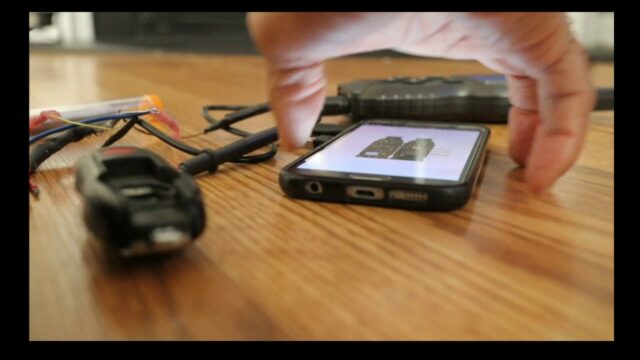
A common misconception, often reinforced by official dealerships, is that a used Porsche smart key cannot be programmed to a different vehicle once it has been paired. However, through a process known as renewal or unlocking, the existing data on a used key can be erased, resetting it to a factory-blank state. This allows the key to be synchronized with a new vehicle’s immobilizer system.
When is Renewal Necessary?
- Acquisition of Pre-owned Keys: When purchasing a used key to save costs compared to buying new from a dealer.
- System Desynchronization: When a key becomes unresponsive due to signal interference or electronic glitches.
- Hardware Recovery: Restoring functionality to a key that has suffered minor electronic failure or battery depletion.
Essential Tools for Programming
To perform a successful unlock and renewal, specialized automotive diagnostic equipment is required. Standard OBD-II scanners are insufficient for these deep-system modifications.
| Tool/Requirement | Purpose |
|---|---|
| Advanced Diagnostic Tool | Devices such as the AUTEL MaxiIM 608 for key generation and renewal. |
| OBD2 Connection Cable | Establishes a data link between the diagnostic tool and the vehicle’s ECU. |
| Smart Key | The physical Porsche key (new or used) to be programmed. |
| Stable Internet Connection | Necessary for downloading vehicle-specific software updates and security tokens. |
Step-by-Step Guide to Unlocking and Programming
Phase 1: Preparation and Connection
- Vehicle Positioning: Ensure the car is parked in a safe area with a stable battery voltage to prevent power loss during programming.
- Ignition State: Turn the ignition to the ON position without fully cranking the engine.
- Hardware Link: Connect the OBD2 cable to the vehicle’s diagnostic port (typically located under the driver-side dashboard) and power on the diagnostic tool.
Phase 2: Navigating the Software
- Vehicle Selection: Use the tool’s interface to select Porsche and specify the exact model and year of the vehicle.
- Menu Access: Navigate to the Immobilizer or Key Programming submenu.
Phase 3: The Renewal Process
- Initiate Renewal: Select the “Renew Smart Key” option. This process wipes the previous vehicle’s ID from the key’s transponder.
- Execution: Follow the on-screen prompts. The tool will communicate with the key to reset it to factory settings.
- Confirmation: Wait for the tool to provide a “Success” or “Completed” notification.
Phase 4: Final Programming
- Pairing: Insert the newly renewed key into the ignition or place it in the designated proximity area as instructed by the tool.
- Synchronization: Execute the programming command to link the renewed key to the vehicle’s current security code.
- Validation: Test all functions, including remote locking/unlocking and the push-button start.
Best Practices for Success
Pro Tip: Always ensure your diagnostic software is updated to the latest version. Outdated firmware can lead to communication errors between the tool and the Porsche immobilizer system.
- Verify Battery Health: Replace the key battery before programming to ensure a strong signal.
- Follow Manuals: Strictly adhere to the specific guidelines provided by both Porsche and the diagnostic tool manufacturer.
- Test Thoroughly: Verify that the key operates all doors and the trunk before finalizing the session.
Conclusion
Unlocking and renewing a Porsche smart key is a powerful way to restore vehicle access and reduce the high cost of dealership replacements. By utilizing professional-grade diagnostic tools and following a systematic approach, it is possible to breathe new life into used keys and ensure the continued security and convenience of the driving experience.
FAQ
Can a used Porsche key really be programmed to a different car?
Yes, although dealerships often claim it is impossible, using a professional renewal tool can reset the key to factory settings, allowing it to be paired with a new vehicle.
What happens if the programming process is interrupted?
Power loss during programming can potentially corrupt the immobilizer data. It is crucial to ensure the vehicle battery is stable.
Do I need a specialized tool for this?
Yes, a standard OBD2 scanner cannot perform key renewal; you need a specialized key programming tool like the AUTEL MaxiIM series.




Leave a Reply